✨ New: AI-powered wait-time predictions are here  See it in action →

Solution · Business Intelligence

The queue analytics that turn waiting into decisions you can act on

Every check-in, every wait, every service becomes data — automatically. See what's happening right now, spot the patterns behind your busiest hours, and staff every branch with evidence instead of gut feel. No spreadsheets. No data team. Live in a day.

  • Built-in, no setup
  • 14-day free trial
  • Live & historical reports
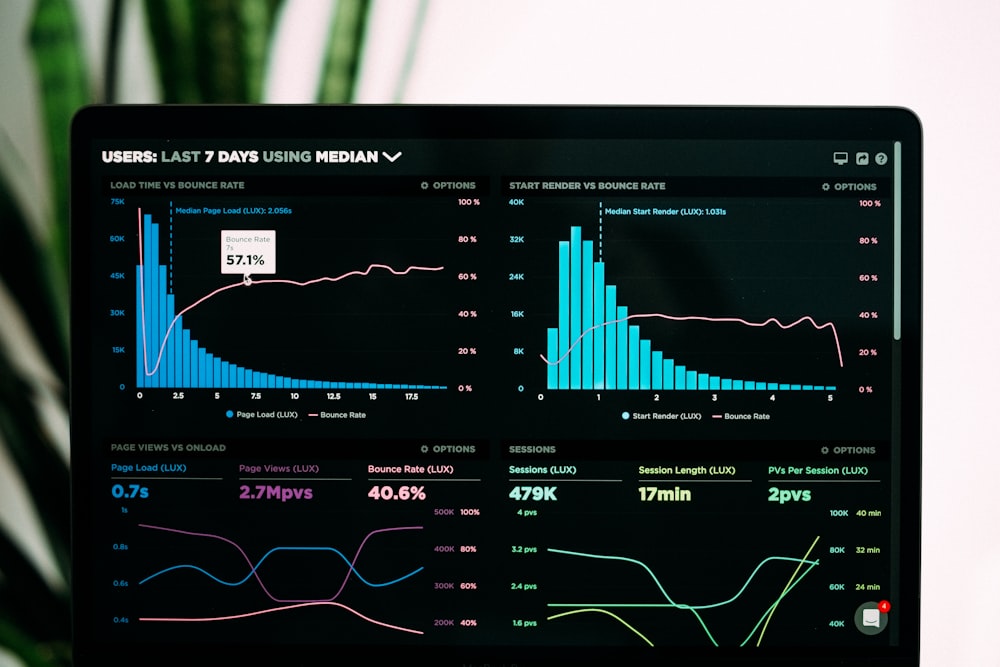
Live analytics dashboard showing queue and service performance charts

Trusted by 65,000+ users across 120+ countries

0%shorter waits with planning
0%better staff utilization
0%of tickets measured
Real timeevery metric, live
The Basics

What is queue business intelligence?

Queue business intelligence is the analytics layer that turns everyday service into decisions. Every time a customer takes a ticket, waits and is served, Qwaiton records it — then presents it as live dashboards, trends and forecasts anyone on your team can read.

Instead of guessing when you're busy, why waits spike, or which counter is carrying the load, you see it plainly: by hour, by branch, by service type. Peaks become schedules, bottlenecks become fixes, and every staffing choice is backed by what actually happened — not a hunch.

Explore the features →

Why It Works

One dashboard, three big wins

Qwaiton analytics tell you what's happening now, why it happened, and what to do next — all in one place.

See everything, live

A single real-time view of every queue, counter and branch means you never manage blind — problems are visible the moment they start.

  • Live wait & service-level monitoring
  • Every counter and branch at a glance
  • Alerts the instant a queue builds up

Spot the patterns

Historical trends reveal your real peaks, your slowest services and your quietest hours — the story numbers tell that no one on the floor can see.

  • Trends by hour, day, branch & service
  • No-show and abandonment analysis
  • Compare any two periods side by side

Plan with evidence

Forecast demand, schedule the right people at the right time, and prove the impact of every change — resourcing becomes a decision, not a gamble.

  • Peak-time forecasting & scheduling
  • Staff performance & throughput reports
  • Measure the ROI of every change
Every Monday Morning

The same weekly review — two very different meetings

A branch manager sits down to work out why last week felt so painful and what to change. Here's how that half hour goes with a drawer full of paper tickets and a gut feeling — and how it goes once Qwaiton has been quietly recording every visit.

Without Qwaiton

Guesswork and finger-pointing

  • "It felt busy Thursday" — but no one can say how busy, or when exactly.
  • Complaints about the wait, yet no number to say if it was 5 minutes or 25.
  • One window looked swamped; whether the others were idle is anyone's guess.
  • Next week's rota is set the same as always — hoping it lands right.
→ Decisions made on memory and mood, repeated until they hurt.
With Qwaiton

The review that answers itself

  • The dashboard shows Thursday 1–3 PM spiked to 22 minutes — there's the culprit.
  • Average wait, longest wait and no-shows are right there, by service type.
  • Counter utilization proves Window 3 sat idle while two others drowned.
  • The forecast sizes next week's peaks, so the rota is built to match reality.
→ A ten-minute review, a clear fix, and a measurably better week.
Everything Included

Every report a modern operation needs — built in

No separate analytics licence, no add-ons. Insight comes with every queue you run.

Live Dashboards

A real-time picture of every queue, counter and branch — wait times, volumes and service levels updating as it happens.

Wait & Service Analytics

Break down average and longest waits, service duration, arrivals, abandonment and no-shows by hour, branch and service type.

Staff Performance

See throughput, average handling time and utilization per agent and per counter — recognize your best and support the rest.

Peak Forecasting

Predictive models learn your rhythms and project busy periods days ahead, so you schedule the right people before the rush arrives.

Custom & Scheduled Reports

Build the reports you care about, then have them land in the right inboxes automatically — daily, weekly or monthly.

Export & Integrations

Send data to CSV, Excel or your warehouse and BI stack via API — queue metrics live right alongside the rest of your business.

The Metrics

Answer the questions you keep asking

Four views, every one of them live and drillable to the counter.

Wait & Flow

How long are people really waiting, and when do the queues build?

Staff & Counters

Who's serving how many, how fast, and which windows sit idle?

Demand & Peaks

What are the true busy hours to plan and staff around?

Experience

How happy are customers, and where does satisfaction dip?

From Data To Decision

Three steps from numbers to action

CAPTURE

Every visit is recorded

The moment a customer checks in, waits and is served, Qwaiton logs it automatically — no manual counting, ever.

SEE

Dashboards make it obvious

Live and historical views turn raw tickets into clear charts — peaks, bottlenecks and staff performance at a glance.

ACT

Plan, staff, improve

Forecast your next peak, schedule to match it, roll out the change, and watch the numbers prove it worked.

No Data Team Needed

Insight anyone can read. No analyst required.

Every metric is captured for you and presented in plain, visual dashboards. Managers get answers without SQL, spreadsheets or a data project — and it all runs in the browser with automatic updates.

  • Zero setup — reporting works from day one
  • Readable charts, not raw tables
  • Role-based views for staff, managers & HQ
  • Enterprise-grade security, always up to date
Start Free Trial
Manager reviewing staff performance metrics at a service counter
Command Center

Every branch, every KPI — on one screen

Roll up the whole group, then drill into any location or counter. Compare branches, rank performance and export the view — so HQ decisions are backed by the same live numbers the floor is running on.

  • Multi-location roll-up & comparison
  • Drill from group total to a single counter
  • Scheduled reports to any inbox
  • API & warehouse export, always synced
Book a Live Demo
Multiple screens showing live queue analytics in a real-time command center
Branch CompareToday
Downtown
3:10
Airport
5:40
Northgate
4:05
4:18avg. wait
1,204served today
93%SLA met
Where It's Used

Smarter decisions for every place people wait

Doctor managing patient flow on a tablet −41% patient wait

Healthcare

Patient flow for hospitals, clinics & labs — calmer rooms, shorter waits.

Explore Healthcare →
Advisory session at a bank branch −40% branch wait

Banking

Route customers to the right teller or advisor and cut branch congestion.

Explore Banking →
Financial advisor meeting a client +28% advisor time

Finance & Insurance

Book and manage advisory meetings without the waiting-room bottleneck.

Explore Finance →
Modern retail store interior −35% walk-aways

Retail

Turn queue time into browsing time — walk-outs become checkouts.

Explore Retail →
Guests being served at a restaurant counter +22% table turns

Restaurants

Digital waitlists and SMS seating for a fuller house and a calmer floor.

Explore Restaurants →
Client at a modern hair salon −50% no-shows

Salon & Spa

Bookings, reminders and waitlists that keep every chair and room busy.

Explore Salon & Spa →
Passengers in an airport concourse −30% queue time

Travel & Airports

Move passengers through check-in, security and desks with less crowding.

Explore Travel →
★★★★★
"For the first time we can prove where the time goes. The Monday review used to be opinions — now it's the dashboard, and our average wait is down a third."
Portrait of Lena Torres
Lena TorresOperations Director, Retail Group
FAQ

Queue intelligence, answered

What is business intelligence for queue management?

It is the analytics layer that turns every check-in, wait and service into usable data. Qwaiton records each ticket automatically and shows live dashboards, historical trends, staff performance and peak-time forecasts, so you plan resources with evidence instead of guesswork.

Do I need a separate analytics tool or data team?

No. Analytics are built into Qwaiton and update in real time. Every queue you run automatically feeds dashboards and reports — there is nothing to configure, and no data engineer required to read them.

What metrics can I track?

Wait times, service times, arrivals and no-shows, abandonment, counter utilization, staff throughput, satisfaction scores and peak periods — live, by branch, by service type, and comparable over any date range.

Can I compare and roll up multiple locations?

Yes. HQ sees every branch on one dashboard, with side-by-side comparison and a roll-up view. You can drill from the group total down to a single counter in a few clicks.

Can I export data or connect my own BI tools?

Yes. Schedule reports by email, export to CSV or Excel, or push data to your warehouse and BI stack through the API — so queue data lives alongside the rest of your business metrics.

How much does it cost?

Analytics are included in every Qwaiton plan starting at $50/month per location, with a free 14-day trial and no credit card required. See full pricing — Enterprise plans add advanced forecasting, custom reports and warehouse integrations.

EncryptedIn transit & at rest
Privacy-firstGDPR & consent ready
ReliableMonitored uptime
120+ countriesTrusted globally
No lock-inCancel anytime
Free guide

The 2026 Queue Management Buyer’s Guide

How leading teams cut wait times, walk-outs and no-shows — a practical checklist you can act on this week.

Not ready for a trial? Grab the guide and decide later.

PDF · straight to your inbox · unsubscribe anytime.

Before you decide

The quick answers that usually come up right before starting a trial.

Do I need a credit card to start?

No. Your 14-day free trial needs no card and no commitment — just an email to get in.

How long does setup take?

Most teams are live the same day. Create your first queue in minutes — no hardware or IT project required.

What happens after the 14 days?

Pick a plan (from $50/mo) if it’s working for you, or the trial simply pauses. We never auto-charge a card you didn’t enter.

Can I cancel anytime?

Yes — there’s no lock-in. Cancel with one click whenever you like and your data stays yours to export.

Does it integrate with my tools?

Yes. Qwaiton connects with Zapier, Zoho, GoHighLevel and Tomedo, so it fits the stack you already run.

Is my data secure?

Your data is encrypted in transit and at rest, handled with GDPR and consent in mind, and never sold.

Stop guessing what happened.
Start seeing it.

Start your free 14-day trial — analytics included, no credit card, live in one day.

Trusted by 65,000+ users · Cancel anytime